
Phone Calls
Foxl phones someone for you through your iPhone and your Mac - what you need, the approval card, what it says on the call, transcripts, limits and what it costs
Foxl can make a short phone call for you. It calls the person, says it is your AI assistant, gives your message, listens to the answer and tells you in the chat how it went. The call goes out through your own iPhone from your Mac, so the person sees your number. When you ask for the call in your chat, it starts right away. When Foxl found the number or the reason for the call itself (on a web page, in a mail, in another tool's answer, or in your memory), it shows the call's card first, and nothing is dialed until you approve it. Foxl never dials after a countdown.
What you need
- Foxl on a Mac. Phone calls are a Mac feature. On Windows and Linux, Foxl has no phone call tool and no Settings > Phone calls.
- An iPhone that lets this Mac make calls, on the same Wi-Fi as the Mac and signed in to the same Apple Account. On the iPhone, open Settings > Apps > Phone > Calls on Other Devices, turn on Allow Calls on Other Devices and switch on this Mac. On the Mac, Calls from iPhone must be on in FaceTime > Settings.
- Foxl Audio, a macOS audio driver that comes with Foxl and carries the call's sound between Foxl and the call. macOS asks for your administrator password once to install it.
- Accessibility for Foxl, so it can see the call and hang up.
- An account for Foxl's voice on the call: the AWS account set up on this Mac, which has to be able to use Amazon Nova 2.5 Sonic in Amazon Bedrock, or, on a Mac with no AWS account, your Foxl credits while you are signed in to Foxl (see What it costs).
Foxl calls numbers in South Korea (+82) and in the US and Canada (+1) only. It can hold a call in Korean, English, Spanish, French, German, Italian, Portuguese or Hindi. It speaks the number's own language, Korean for a Korean number and English for a US or Canadian one, unless you ask for another of these or say the person speaks it; then the whole call is in that language, and the approval card shows it under Language. Ask for any other language and Foxl tells you which ones it can use.
Set it up
You can set up calls in Foxl's first run (Set up phone calls, which you can skip), in Settings > Phone calls, or in the chat: when you ask for a call before this Mac is ready, the same steps appear under Foxl's reply.
- Foxl Audio: press Install. macOS asks for your password ("Foxl wants to install Foxl Audio so it can talk on the calls you approve."), and the row then reads Ready.
- Accessibility: press Allow. macOS asks, and System Settings opens at Accessibility; turn on Foxl there. The row reads Allowed by itself once the switch is on.
- Your iPhone: turn on Calls on Other Devices for this Mac, as above. This is the one step only the iPhone can do, so Foxl cannot check it from the Mac.
- Voice account, the last row in first run and in the chat: Ready with "this computer's AWS account" or "your Foxl credits, at most 1.39 credits a minute". Otherwise it says what is missing, with the button that fixes it: Sign in (to Foxl, so the voice can use your credits), Set up (an AWS account in Amazon Bedrock, when calls on Foxl credits are not available to you), Credits (when your credits do not cover a minute of a call) or Check again (when Foxl could not reach its service). Settings > Phone calls shows the same answer as Voice account under Call voice.
When the rows are done, tell Foxl and it prepares the call again. The steps work only in the Foxl window on the Mac; on a phone or at app.foxl.ai they say to set up phone calls there.
Ask for a call
Ask in a chat, in your own words, for example "call the guesthouse and tell them I arrive at 11 tonight". Foxl first asks about anything unclear: who to call, the number, exactly what to say, and a time or date and its time zone. Then it shows the approval card.
Calls go out from your own chats only. A schedule, a check-in, a channel (Telegram, Slack and the others), the Notes assistant, the Chrome extension, a Foxl Code task and a subagent cannot make one. You can ask in the Foxl window on the Mac, or in a chat with that Mac from the iPhone or Android app or app.foxl.ai, where the approval card and the call's card show too. Foxl makes one call per request.
A number Foxl already knows
When the person you name is saved in your memory with their number (USER.md or MEMORY.md, see Memory), "call my wife" is enough: Foxl uses that number instead of asking you to type it. The card shows it with "Saved number from your memory. Check it before you allow.", and nothing is dialed until you allow it. This card appears even for a number you always allow. If two saved numbers fit the name, Foxl asks which one, each as a reply you can tap. Foxl looks only in USER.md and MEMORY.md, not in your daily journal. With Settings > Memory > Save memories off, or in a temporary chat, Foxl asks you for the number instead.
The approval card
When a call needs your approval (see above, and every call while Settings > Safety > Ask before Foxl places a call is on), Foxl shows a card in the chat:
- Call (name)?, with the full number.
- Message: what Foxl will say.
- Introduces itself as: "An AI assistant calling for (your name)".
- Calls from: "Your iPhone, through this Mac. They see your number."
- Limits: for example "Up to 3 min, at most $0.09" (see Limits).
- Whether a transcript is kept (see Transcripts).
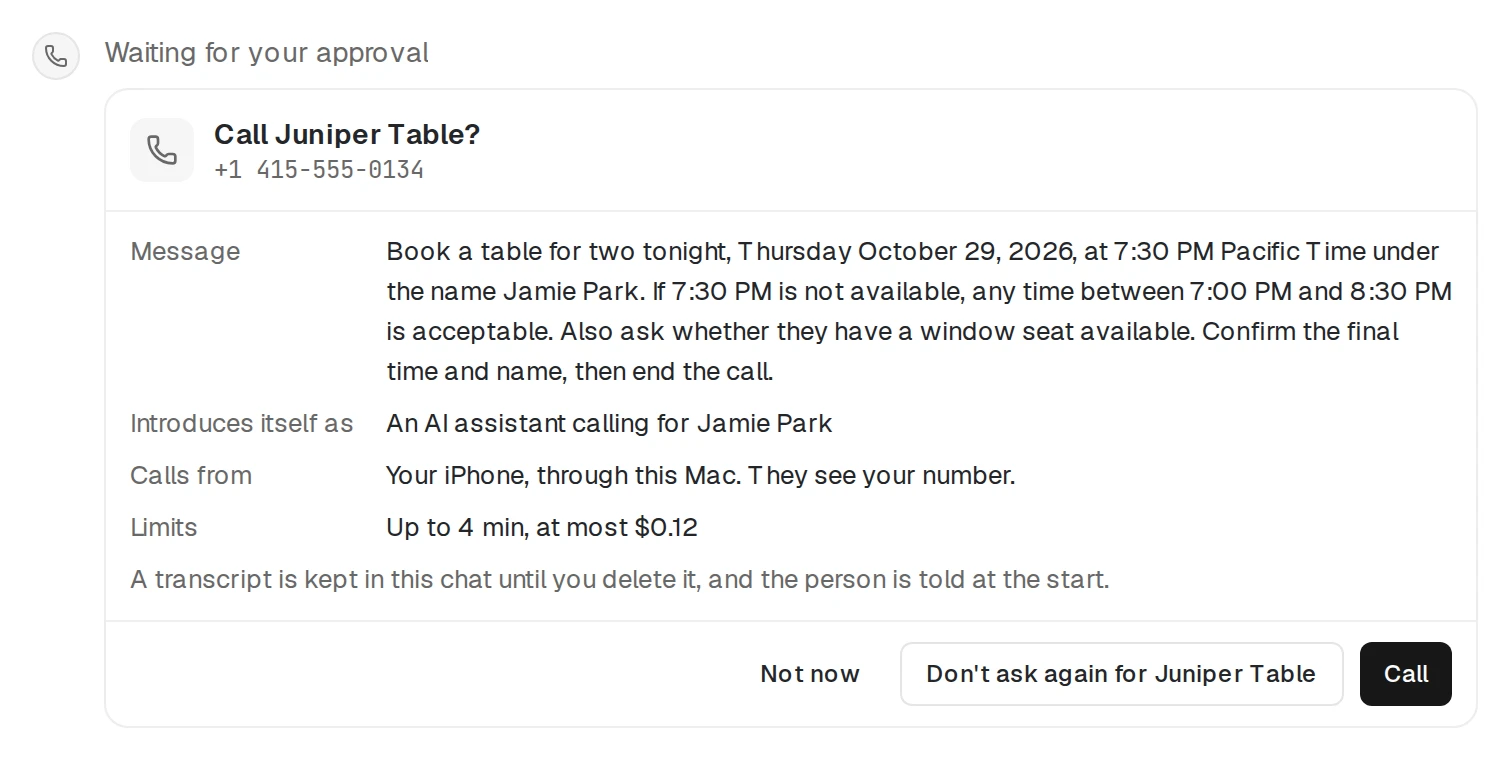
On the computer the card has Not now, Don't ask again for (name) and Call. On a phone it has Call, Not now and Don't ask again for (name). The card appears even with auto-approve on (see Security). If you do not answer, no call is made.
Each approval is for that one call. Foxl cannot change the number, the message or the length after you approve; a change shows a new card.
Don't ask again for someone
Don't ask again for (name) saves that one number: later calls to it go out without the card, and every other number still asks. Everything else stays the same for those calls: they go out only from your own chats, each one opens by saying it is your AI assistant, and the same time, cost and daily limits apply. A number Foxl takes from your memory still shows the card.
Settings > Safety > Always-allowed calls lists these numbers, partly hidden, and removes one; the next call to it asks again. Signing out of Foxl on the computer clears the list.
On the call
- Foxl says it is your AI assistant and checks it has the right person, in the call's language. In English: "Hi, this is (your name)'s AI assistant. Am I speaking with (name)?"
- Once they confirm, it says in one sentence why it is calling and asks whether they have a moment.
- If they agree, it says your message, then listens. It answers questions only from your message, and offers to pass on anything else to you.
- It ends with a short goodbye and gives the person a moment to say theirs before it hangs up.
If the person would rather not talk, or not to an AI, Foxl says one polite sentence and waits for their reply before it ends the call. If they say it is the wrong person, it apologizes and says goodbye. If an answering machine, a voicemail greeting or a phone menu answers, it hangs up without leaving your message. If the line goes quiet, it asks once whether they can hear it.
Foxl never claims to be you or a person, and speaks in a stock voice, never yours. The person on the phone cannot give Foxl new tasks: it declines another call, a payment, a booking, an account change or details about you beyond your message, and offers to pass the request on.
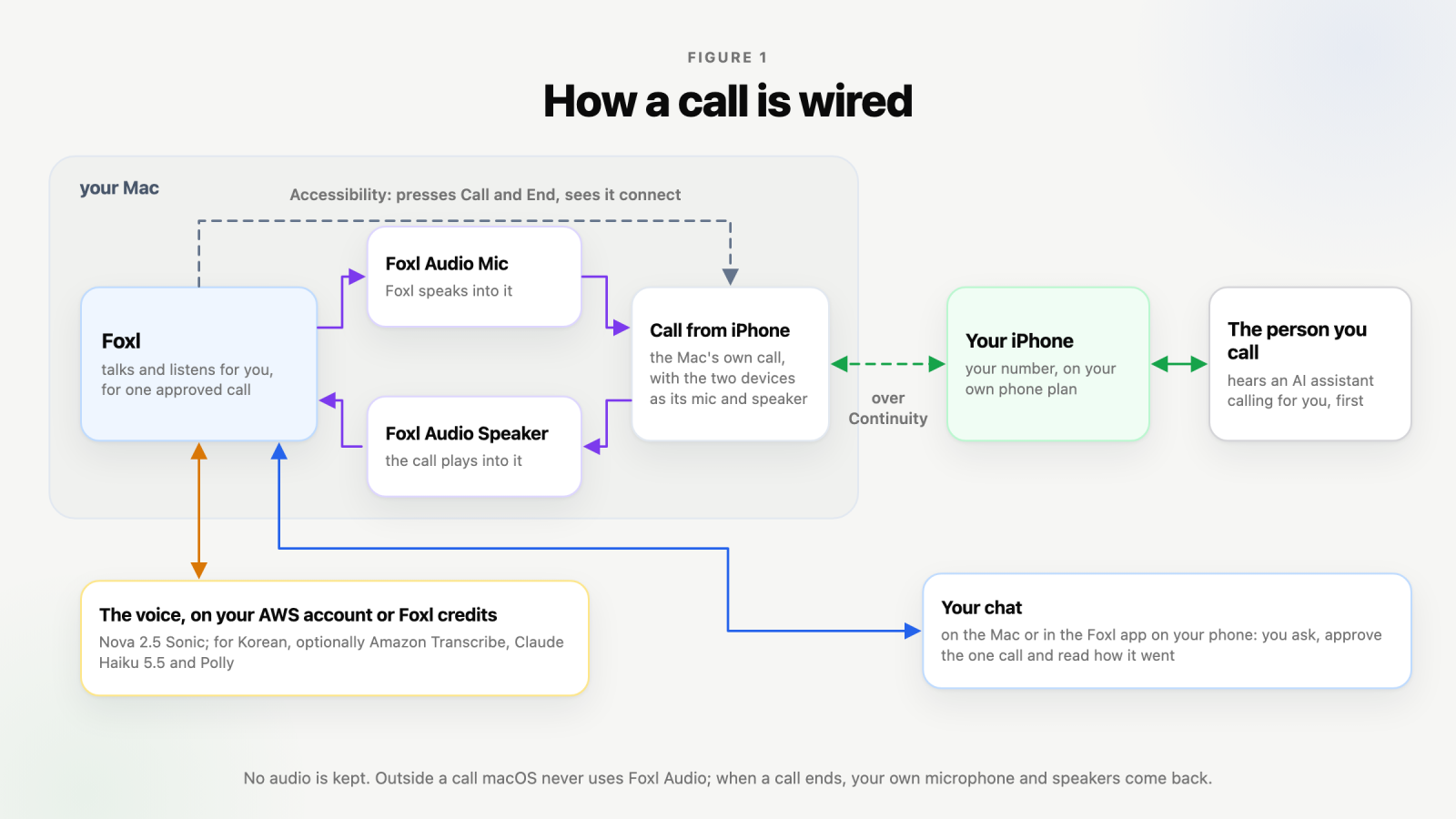
While a call is on, your Mac's sound input and output switch to Foxl Audio, so the call's sound goes to Foxl and not to your speakers. They switch back when the call ends. Foxl Audio is two audio devices: Foxl speaks into one, which the call uses as its microphone, and the call plays into the other, which Foxl listens to. macOS has no way for an app to place or end a call made through an iPhone, so Foxl presses Call and End on the call's banner through Accessibility, which is why it does not start a call without that permission.
 Stop call on the
call's card, or Stop in the chat, hangs up at once.
With Nova 2.5 Sonic, the default voice, a dropped connection to the voice service does not end the call: Foxl opens a new connection with the conversation so far and carries on where it stopped, and a drop before Foxl has introduced itself starts again from its greeting. This happens at most twice in a call. If the new connection fails too, the call ends. On Foxl credits the same holds for the voice service's own connection to Amazon Bedrock, while a dropped connection between this Mac and Foxl's service ends the call.
The result
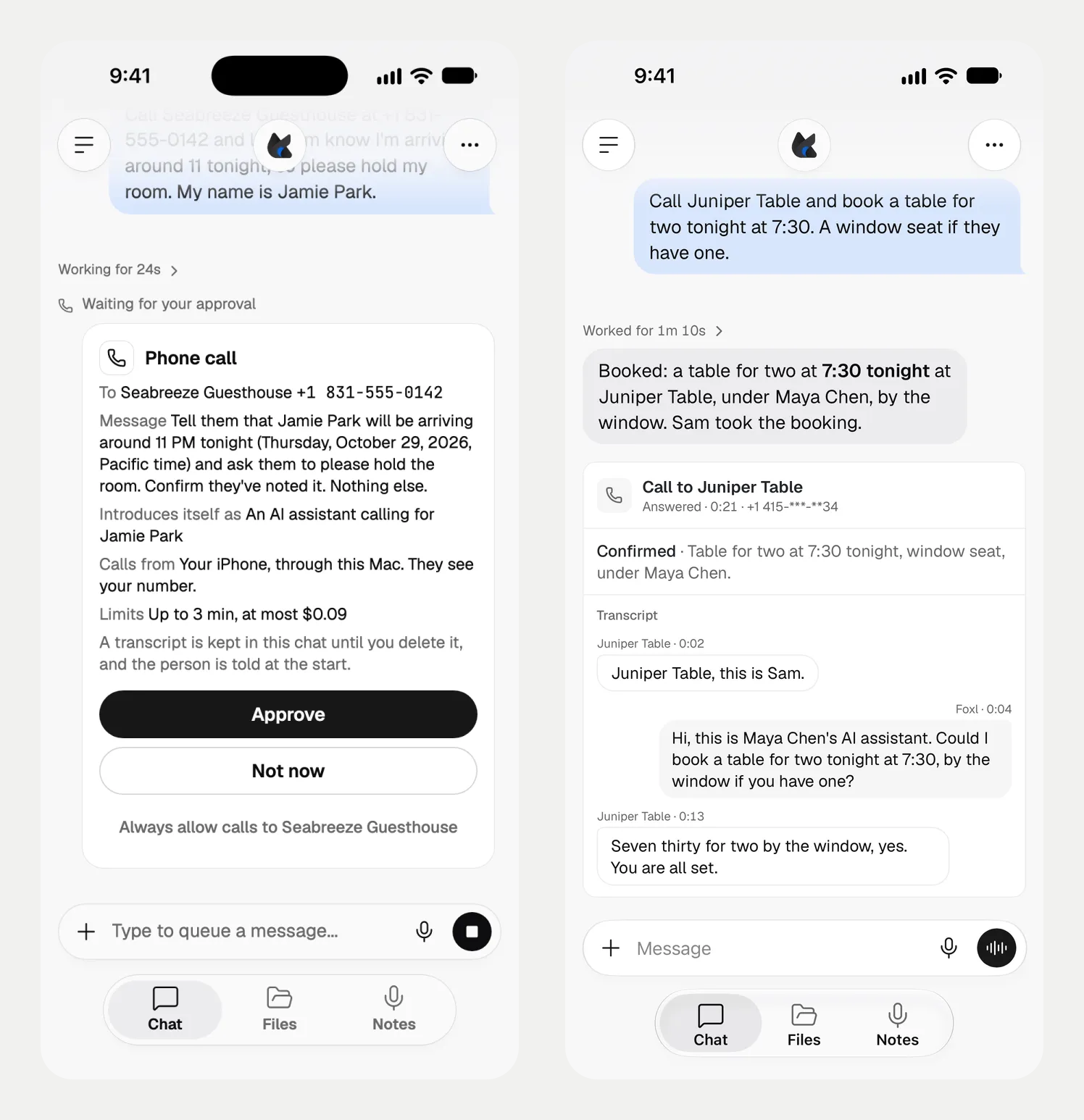
When the call ends, Foxl's reply tells you in a sentence or two, and the call's card in the chat shows how it ended: Answered with how long it lasted, Busy, No answer (after about 30 seconds of ringing), Voicemail answered, Stopped by you, Ended at the time limit, Ended at the cost limit, Ended: the voice service failed or Call failed.
For an answered call it also shows what came of it, with one sentence of what the person said:
- Message delivered: they heard your message.
- Confirmed: they confirmed the detail, for example the time.
- Declined to talk with an AI assistant, Asked for a call back or Wrong person.
- Voicemail, message not left or Not completed.
On Foxl credits the card also says how many Foxl credits the call used.
If Foxl cannot confirm that a call was placed, the card says Could not confirm the call was placed; not redialed, and Foxl does not call again.
Transcripts
With Settings > Phone calls > Keep transcripts on (the default), the call's card shows what each side said, line by line: Live conversation during the call and Transcript after it. It is kept as text in that chat until you delete the chat. No audio is kept.
Turn Keep transcripts off to keep none, or ask for one call without a transcript. The card then says "No recording or transcript is kept."
On a US or Canadian number, when a transcript is kept, Foxl's opening tells the person, in the call's language: "A transcript of this call is being kept." The card says so too. On a Korean number the transcript is kept without saying so.
Limits
| Limit | Value |
|---|---|
| Length | 3 minutes unless you ask for another length, from 1 to 5 minutes. The call ends at its limit |
| Cost | The card's "at most" amount, in dollars on your AWS account or in credits on your Foxl credits (see below). Foxl does not prepare a call that could cost more than $1.00 |
| At once | One call at a time on a computer |
| Per day | 10 calls in 24 hours |
| The card | Waits for your answer, and an Allow places the call however late it comes (3 minutes with Settings > Safety > Time out unanswered requests on) |
| Ringing | About 30 seconds, then No answer |
| The message | Up to 600 characters |
Foxl never calls:
- emergency and service numbers, such as 112, 119 and 114 in Korea, or 911, 411 and the other N11 numbers in the US and Canada
- premium-rate numbers (060 in Korea, 900 and 976 in the US and Canada)
- +1 numbers outside the US and Canada, such as Jamaica, the Bahamas or the Dominican Republic (US territories such as Puerto Rico and Guam can be called)
- numbers in any other country
In Korea it calls mobile, landline, 070, 050 and 080 numbers. A representative number (15xx, 16xx, 18xx) can be called, and the card warns that it is often not reachable from outside Korea.
What it costs
-
The call is on your iPhone's phone plan, from your number. Foxl adds no phone charge.
-
Foxl's voice runs on one of two accounts, and Settings > Phone calls > Voice account says which:
- This computer's AWS account, when this Mac has the AWS credentials Foxl uses for Amazon Bedrock. AWS bills that account; Foxl credits are not used. The card's "at most" amount is Foxl's estimate of that voice cost at the call's length limit, at 3 cents a minute for Nova 2.5 Sonic and 5 cents a minute for Amazon Polly. With Nova 2.5 Sonic, a call that reaches it ends.
- Foxl credits, on a Mac with no AWS account while you are signed in to Foxl. The voice then runs through Foxl's own cloud service on Foxl's AWS account and is paid from your credits. While it runs, a call holds about 1.39 credits for each minute of its length limit, and the card shows that as its limit: "Up to 3 min, at most 4.17 Foxl credits" for a 3-minute call. You need that much available to place it. The call is charged only for what it used, which its card shows when it ends, and the Usage Breakdown on your Account page lists it as Phone calls. A call that would use more than it holds ends. On the Twilio line the card also names what the line can cost on your Twilio account.
When neither can carry the call, for example with no AWS account and signed out of Foxl, or without the credits for a minute of a call, Foxl tells you before it dials, and the Voice account step says what to do.
Which voice service speaks, on either account:
- English, Spanish, French, German, Italian, Portuguese and Hindi calls: Amazon Nova 2.5 Sonic.
- Korean calls: Nova 2.5 Sonic by default. Settings notes that AWS does not officially support Korean on it. Choose Amazon Polly instead, and Foxl listens with Amazon Transcribe, answers with Claude Haiku 5.5 on Amazon Bedrock and speaks with Amazon Polly.
Settings > Phone calls
In the Foxl window on the Mac, Settings > Phone calls has:
- Calls go out on: This Mac, your iPhone through this Mac, as this page describes. It also offers Twilio, which calls from your own Twilio number instead and needs your Twilio account details and a public https address that reaches this computer.
- The setup rows from Set it up. When a Foxl update brings a newer Foxl Audio, its row offers Update: macOS asks for your password once, and the Mac's sound stops for a second. Remove Foxl Audio takes it off this Mac (macOS asks for your password), and calls through this Mac stop working until you install it again. Neither runs during a call: wait for the call to end.
- Keep transcripts, above.
Under Call voice:
-
Voice account: This computer's AWS account, Foxl credits (with the most a minute can take and the credits you have), or Not available, with why: signed out of Foxl, calls on Foxl credits not available on your account, or Foxl could not check.
-
Language: the call language whose voice you see. Each language keeps its own voice, and a call speaks with the voice of the language it is held in.
-
(Language) voice: that language's voices, each marked female or male with the language it was made for, and Multilingual for Tiffany and Matthew, who speak every call language. The first is the default.
- Korean: Tiffany or Matthew with Nova 2.5 Sonic, Seoyeon or Hyunduk with Amazon Polly
- English: Tiffany, Matthew, Amy (British), Olivia (Australian), Kiara or Arjun (Indian)
- Spanish: Lupe or Carlos; French: Ambre or Florian; German: Tina or Lennart; Italian: Beatrice or Lorenzo; Portuguese: Carolina or Leo; Hindi: Kiara or Arjun. Each of them also offers Tiffany and Matthew.
Play sample speaks one sample sentence in that voice at phone quality and calls nobody. It runs on this computer's AWS account (less than one cent) even when calls use Foxl credits, so a computer without one cannot play it.
Advanced voice options, folded until you press Show (it opens by itself when a setting in it has a note):
- Korean calls: Nova 2.5 Sonic or Amazon Polly.
- Speaking speed (Amazon Polly voices on Korean calls): Slower, Normal or Faster.
- Pause before answering (Nova 2.5 Sonic): Short, Medium or Long. Short answers fastest but can cut off someone who speaks slowly.
- Voice region: Auto picks the fastest region from this computer; Oregon, N. Virginia, and Tokyo while Korean calls use Nova 2.5 Sonic (Amazon Polly does not run there).
On Foxl credits the voice region and the speaking speed do not apply: the voice runs in the region of Foxl's service, and Amazon Polly at its normal speed.
These settings are saved on the Mac. On a phone and at app.foxl.ai, Settings lists Phone calls while your Mac is connected, and only the call voice and its advanced options change there: the line, its setup and Keep transcripts change in the Foxl window on the Mac. Settings > Safety > Always-allowed calls shows there too while your Mac is connected.
When a call cannot start
When something on your side stopped the call, its card shows How to fix this with what to try:
- The iPhone could not place it: put your iPhone and this Mac on the same Wi-Fi, signed in to the same Apple Account, turn on Calls on Other Devices for this Mac on the iPhone, and turn on Calls from iPhone in FaceTime > Settings on the Mac.
- The Mac offered no call: check Calls from iPhone, and keep your iPhone unlocked, nearby and on the same Wi-Fi as the Mac.
- The call banner was empty: close the call banner on the screen, and make sure Foxl is on in System Settings > Privacy & Security > Accessibility.
- Foxl does not know your Mac's call buttons in its language: switch the Mac to English or another major language in System Settings > General > Language & Region.
- Headphones took the sound: if headphones connect during a call (AirPods can switch the Mac's audio on their own), Foxl stops talking and leaves the call to you. Keep them from connecting during a Foxl call.
A busy line, a call nobody answered or a person who declined gets no hint. Foxl also tells you in the chat when another call is in progress, when Foxl Audio is being updated, and when you have reached the 10 calls in 24 hours. Then ask again.
The call's record on your Mac
Each call leaves a small record of how it went in Foxl's logs folder, ~/.foxl/data/logs
(call-trace.jsonl, and mac-call-diagnostics.jsonl for a call through your iPhone): timings,
sound levels and how the call ended, with no audio, no words and no phone number. It helps trace a
problem with a call afterwards. Foxl does not send it anywhere, and it is not deleted with the
chat. Set the environment variable FOXL_CALLS_TRACE=off for Foxl to keep none.
See Security for how Foxl asks before acting, and Notifications for what reaches your phone.